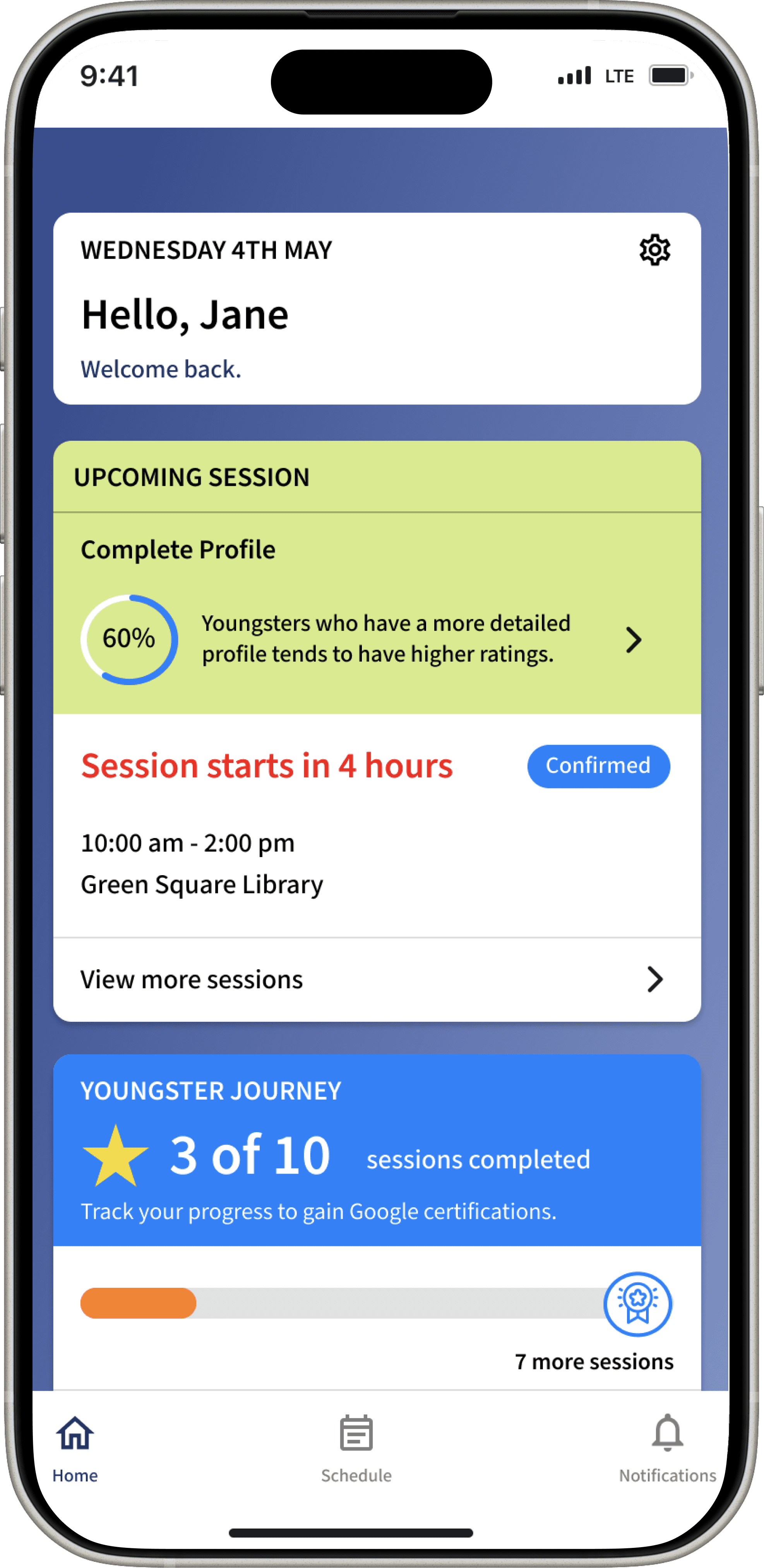
Youngster
A platform used to teach seniors technology, taught by young people.
Project type: UX Design
Timeline: May - July 2025 (10 weeks), with a self initiated second iteration in January 2026
Project role: Sole UX/UI designer (mentored by Renan Castro, Senior UX designer)
Key skills: UX design, heuristic analysis, competitive analysis, wireframes, user testing.
TL;DR

No description on why users have to provide a police check, no option to save progress
THE PROBLEM
Problem: Youngster's CEO believed young users were abandoning sign-up because forms asked for things without explaining why, most notably the police check.
Testing confirmed it: 5 of 5 participants hit that exact wall.
KEY DECISIONS
Redesigned the police check step to explain what it is, why it's required, and that it's covered for first-timers.
Split profile completion from 5 dense steps into 10 lighter ones, trading step count for one clear decision per screen
Added a persistent progress bar with save-and-exit, so users always know how much is left
OUTCOME
The final prototype consists of one question per screen. This explains why they're doing a step.
Here's the full story behind that fix, starting with the stakeholder interview that defined the problem —>
PROJECT OVERVIEW
The client
Youngster connects young people (16-24 y/o) to teach seniors digital skills through paid opportunities.
The problem
Without young people signing up, Youngster has no sessions to offer. According to Youngsters' analytics, 80% of young users who start a profile never finish it.
The clearest failure point came straight from the stakeholder:
“During sign up, most users get stuck on the police check because it requires payment. But most users don't realise that if they don't have a police check, it's covered through their first session. Young people often miss this part when they sign up.” ”
Stakeholder Interview quote by Tony Rothhacker
This quote defined the project
Users abandon forms that demand things without explaining why. A police check sounds expensive and intimidating, unless someone tells them it's covered. Nobody was telling them.
Design objective
Get young users through sign up on their first attempt by giving every step context: what's being asked, why, and what happens next.
Constraints
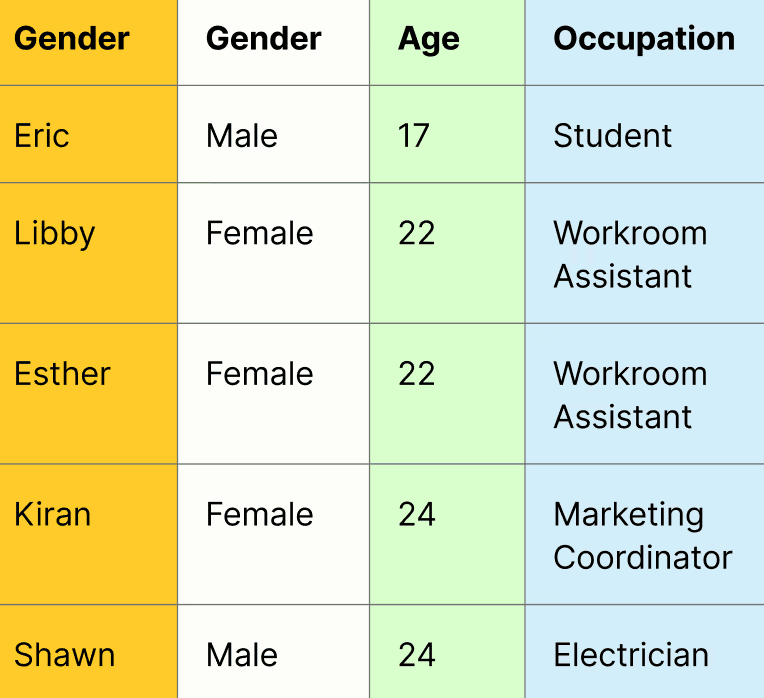
I interviewed and tested with 5 participants aged 16–24 from varied working backgrounds (the right demographic, but not active Youngster members).
Findings reflect first time onboarding, not the experience of returning tutors. With client access, I'd test next with active Youngster participants to check whether the flow sets accurate expectations for the sessions themselves.
BACKGROUND RESEARCH
Competitive Analysis - the market gap
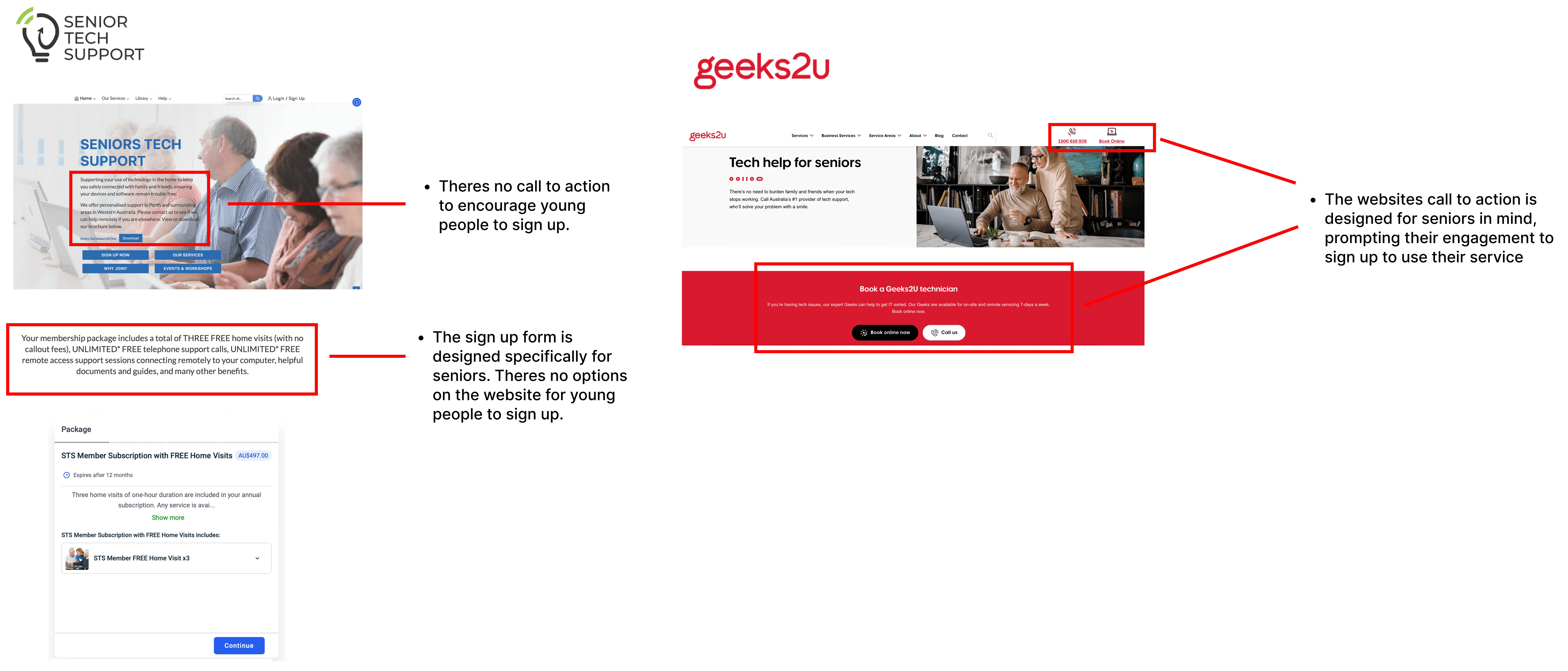
With my team, we reviewed 22 platforms with similar models across volunteering, contract work, and senior support. The pattern: most were designed with seniors in mind, not the young person.
15 of 22 platforms did not speak directly to 16–24 year olds because it consisted of:
Complicated flows
Dated designs
Dense multi field forms
No progress indicator to track sign up flow
E.g: Senior Tech Support and Geeks2u are two services designed to assist seniors with tech support, an initiative similar to Youngster.
Learning from the best sign up flows
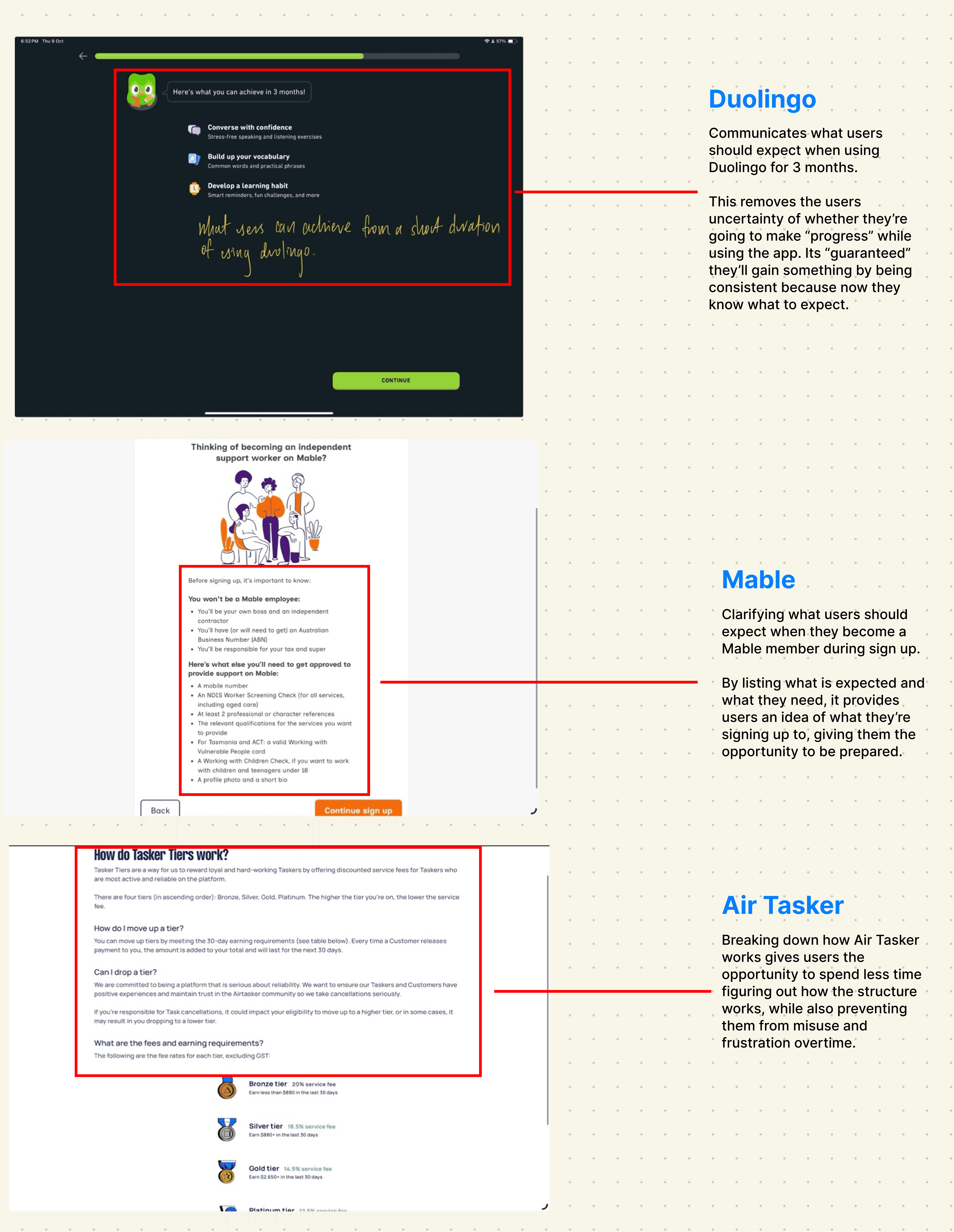
I then analysed three platforms known for onboarding that converts:
Duolingo — education, gamified onboarding
Airtasker — short-term task marketplace
Mable — support-worker marketplace, Youngster's closest direct competitor
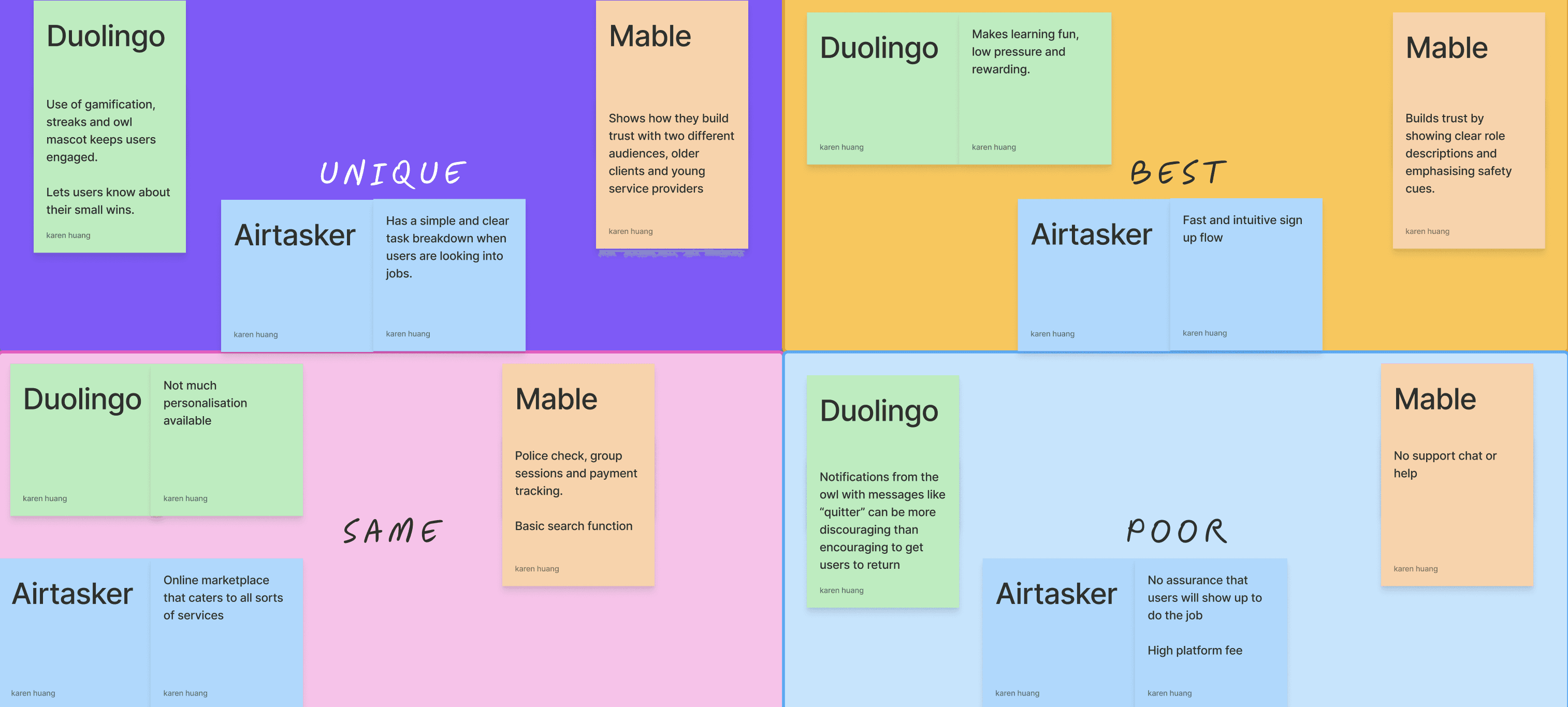

Three patterns held across each platform, and each one maps to a decision in my final design:
One question per page
Users focus on a single decision at a time —> This is why my profile completion moved from 5 dense steps to 14 light ones. (see final design)
Progress made visible
Whether 2 steps or 9, a progress bar tells users the end is in sight. The antidote to mid flow abandonment. —> Included a progress bar with a save and exit in my flow.

Expectations set inside the flow
Duolingo and Mable explain how the platform works during sign up, not after. Transparency early earns trust later. —> This became my answer to the police check problem.
USABILITY TESTS
Learning more about users
I ran interviews and moderated usability tests on Youngster's current site with 5 participants (16–24, varied working backgrounds), combining behavioural questions with two observed tasks.
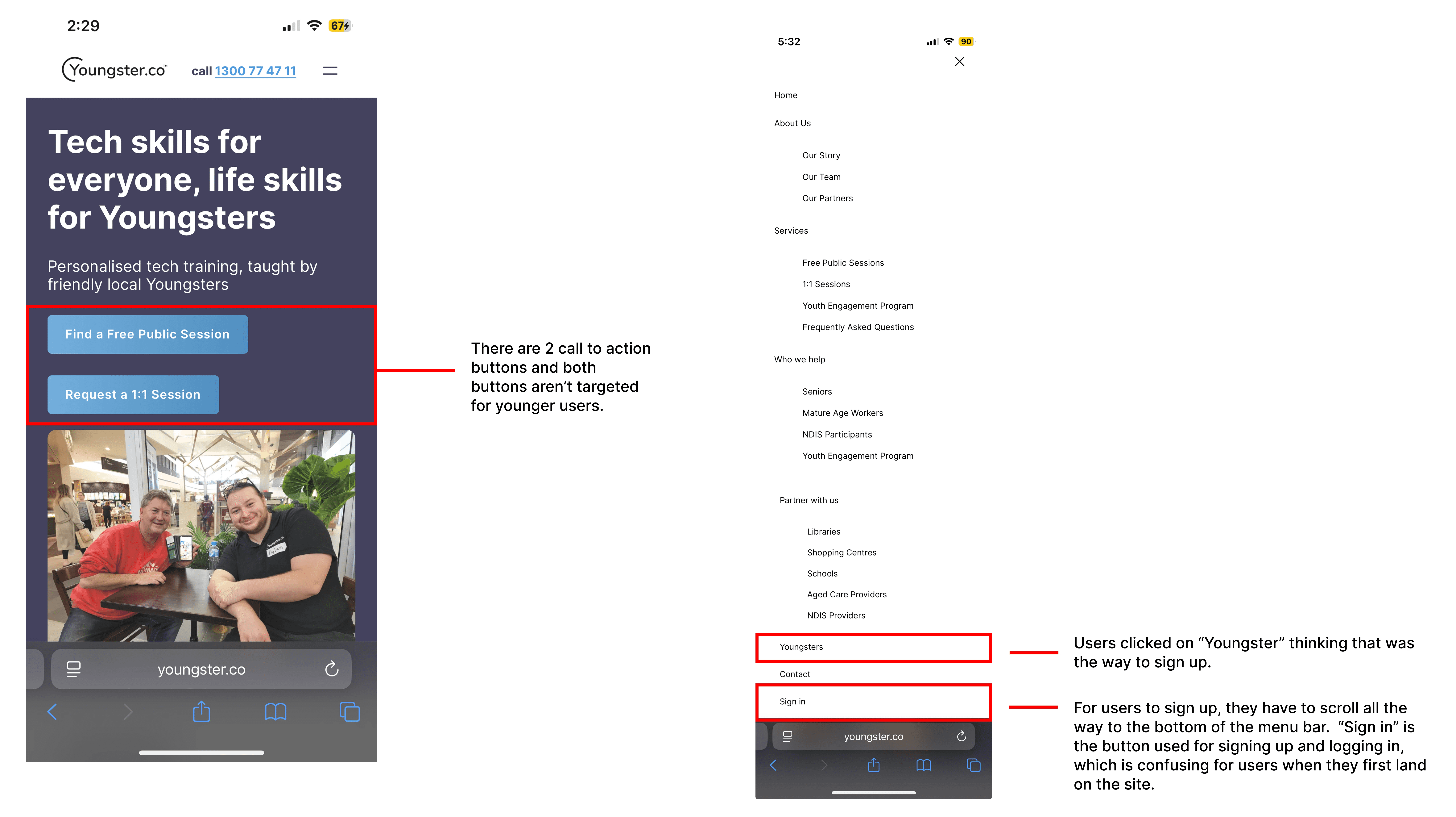
Task 1 — Find your way into sign up
4 of 5 participants couldn't find where to start. No clear call to action on the home page; participants clicked through "Partner with us" and "Youngsters" hoping one would begin registration, averaging 3–4 dead-end clicks before locating the sign-in button in the menu bar.
"Just have the homepage really punchy. I don't want to search for things."
Interview quote from Esther
How this informed my design
Added a clear, visually distinct sign-up button so users don't have to guess where to start.
Simplified the navigation structure, informed by what worked on the platforms I reviewed in competitive analysis.
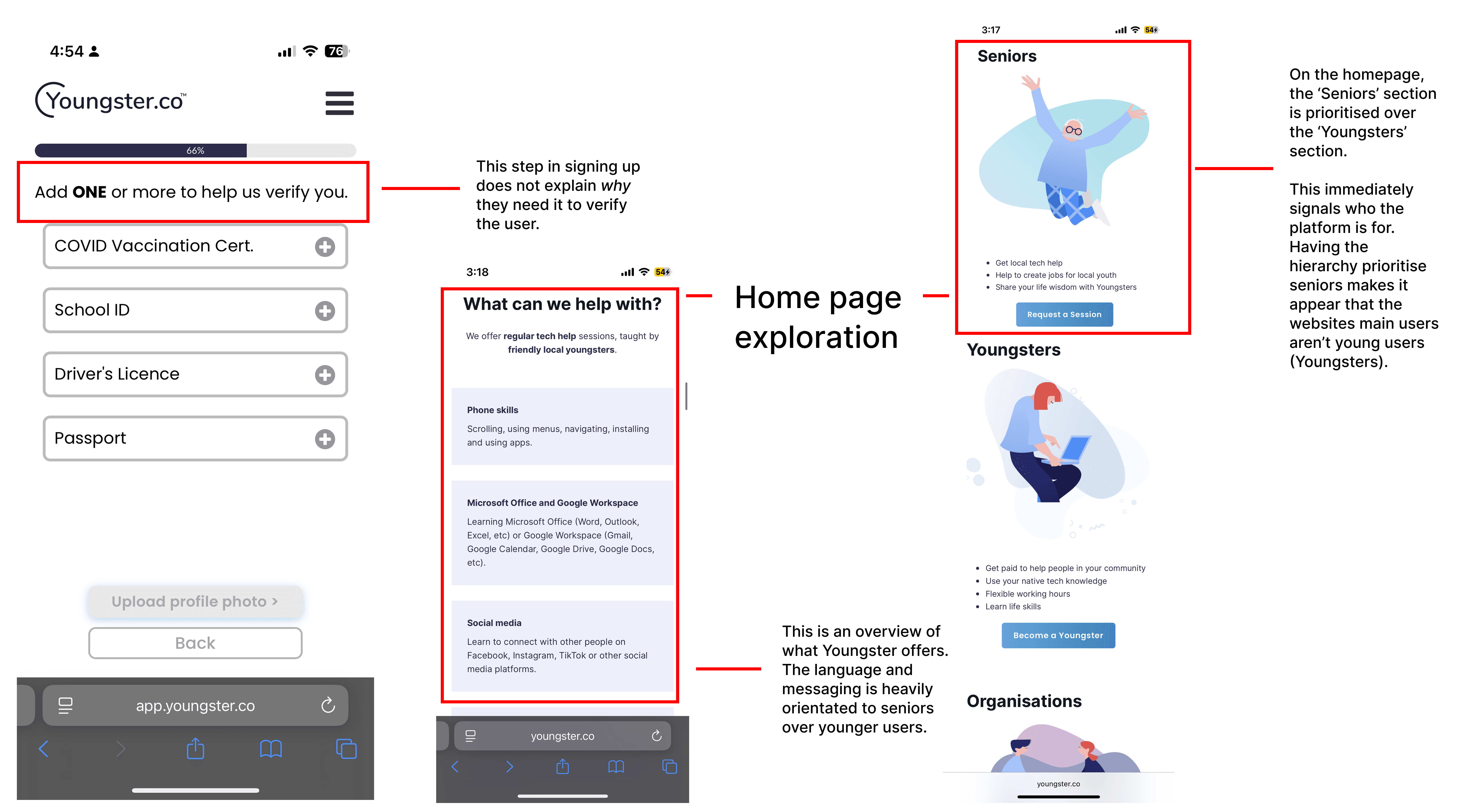
Task 2 — Complete the sign up
5 of 5 participants hit the same wall: the flow felt like it was written for seniors, and steps like the police check and vaccine pass appeared with no explanation of their relevance. This is the drop off Tony described, reproduced in testing.
"I like something that is so minimal… if there's too much stuff, I get distracted."
Interview quote from Libby
How this informed my design
Added inline context to every step especially steps that required verification, explaining what it is and why it's required.
Included a visible progress bar to have the ability to pause without losing work.
A softer theme also ran through the interviews: participants at this age respond strongly to encouragement and belonging.
This shaped the tone of the flow: warm, affirming microcopy rather than administrative language.
"If I don't have people around me, I feel very lonely. Which is why having a community where everyone knows you and understands you feels welcoming."
Interview quote from Eric
Archetype — Jane, the nervous first job seeker
Jane synthesises the five interviews: eager for her first work experience, motivated by encouragement, derailed by ambiguity.

"For me to reach my goals, I need to be more determined to work on my confidence and communication."
— Jane
She values
Knowing what's expected of her and having flexibility
Feeling welcomed rather than processed
She abandons when
A step demands something unexplained
She can't tell when sign up is complete.
Where the journey breaks
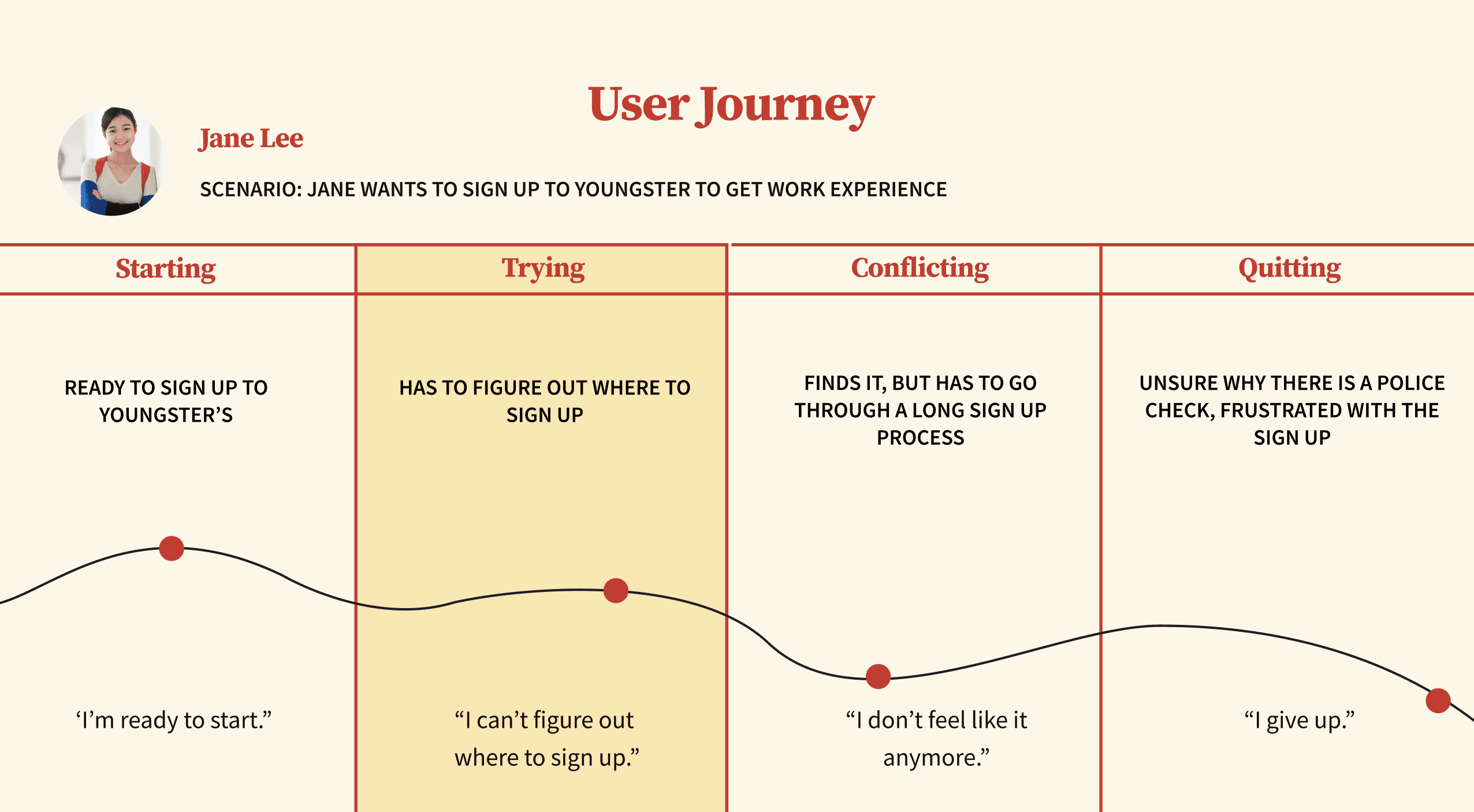
Jane's journey map traces the observed sign-up experience: hunting for an entry point → early-flow optimism → the police check moment, where confusion peaks and 4 of 5 test participants stalled.
CHALLENGING MY DESIGN THINKING
Sketches —> wireframes
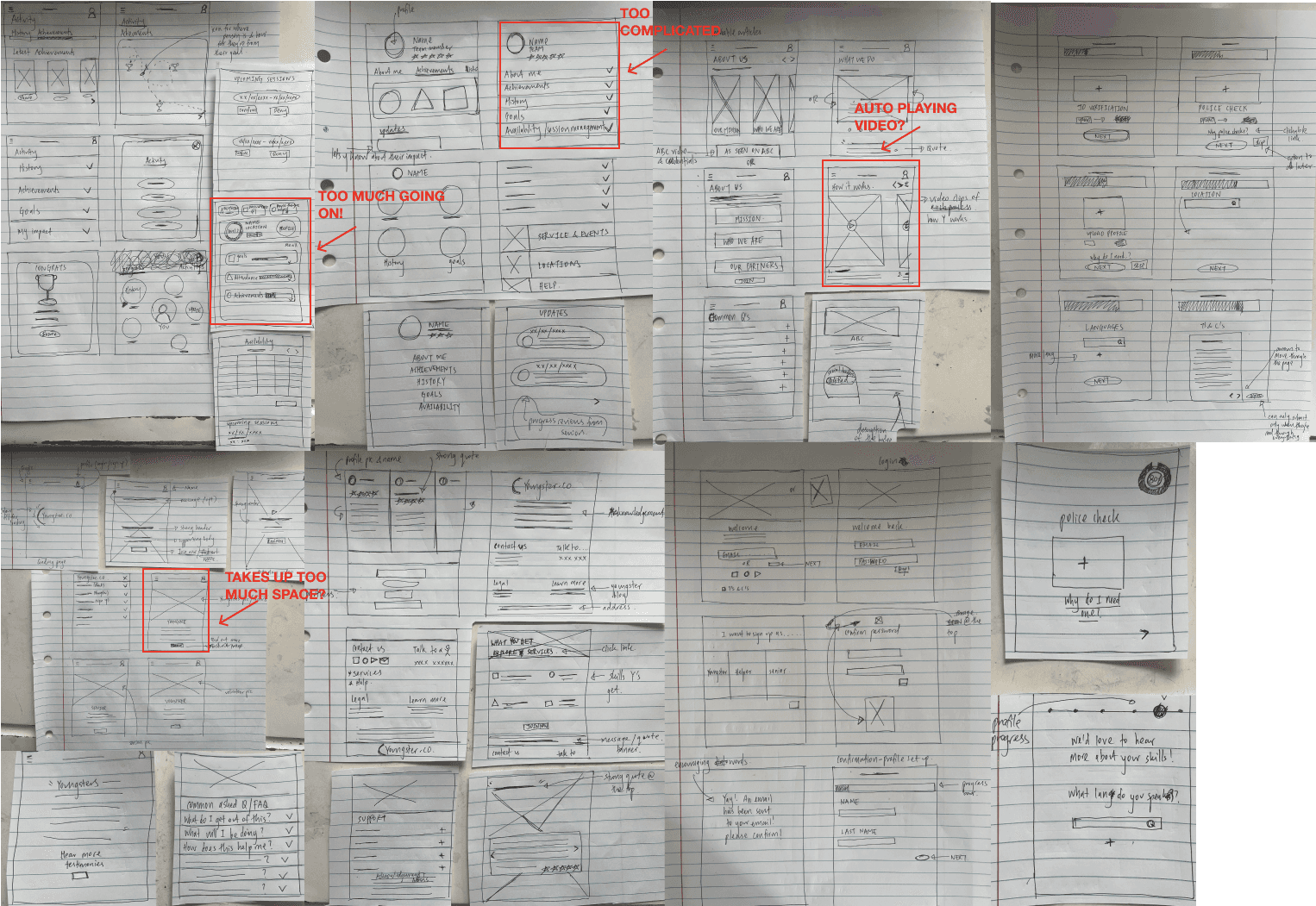
Crazy 8s to explore layouts and information architecture, prioritising a single path through the flow.
First round of testing (lofi, 3 participants)
Participants were asked to think aloud and were asked to
Sign up
Complete a profile
Account settings
Navigating between dashboard and session management
What I learned
Users preferred a straight forward user flow.
What I did about it
Include clearer visual guidance using buttons and signals to guide them through a step by step flow.
What I learned
Users missed important actions like "save and exit" or "complete profile."
What I did about it
Reduced competing elements per screen and gave key actions more visual weight.
REVISITING THE PROJECT
Why I came back
After two more projects sharpened my design judgement, I re-read this one and saw the problem: my original solution optimised for speed, but the research had been telling me the real currency was clarity. Users didn't need a faster form, they needed a form that explained itself. I rebuilt the flow around that principle.
What changed:
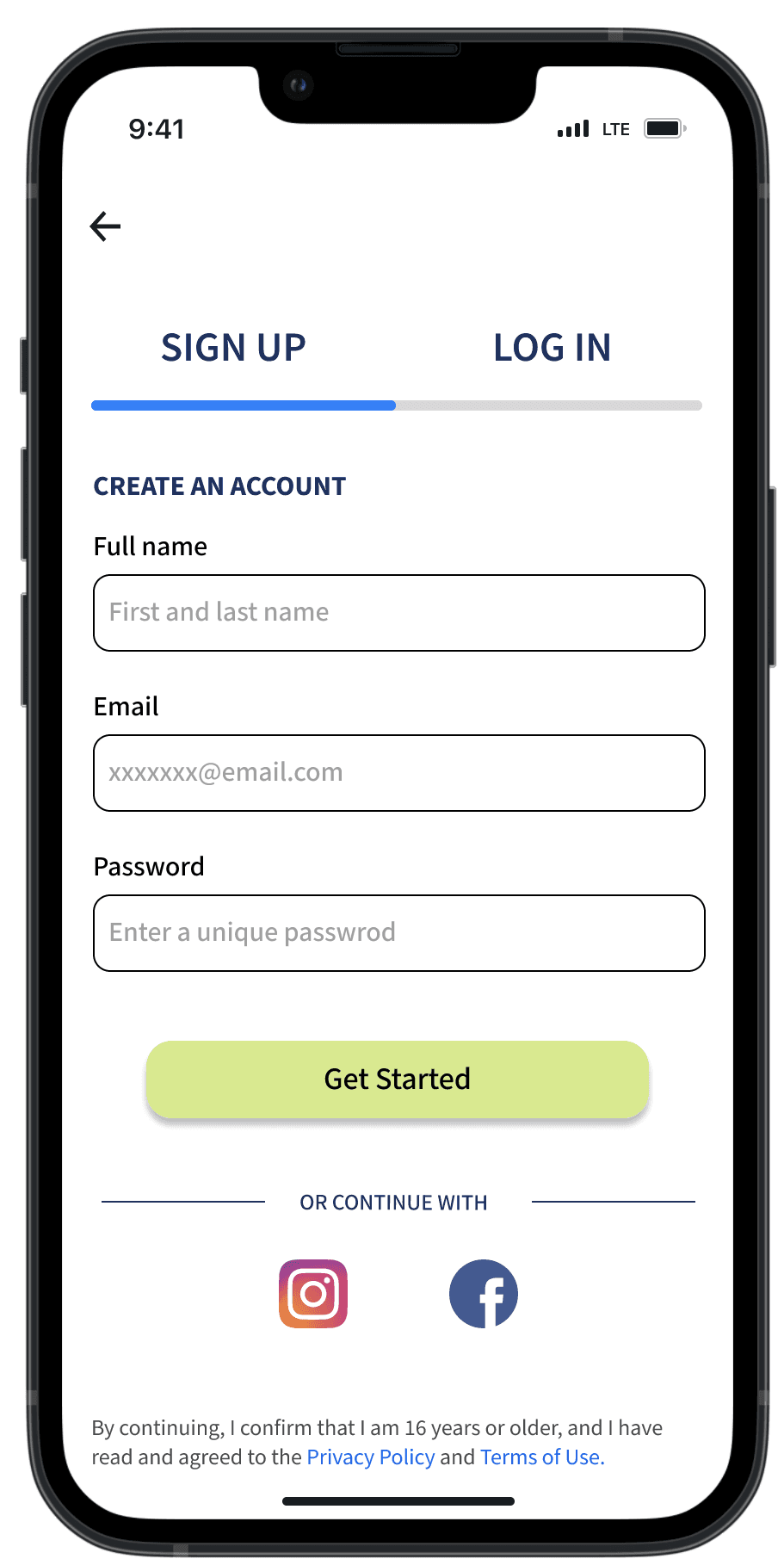
Sign up entry
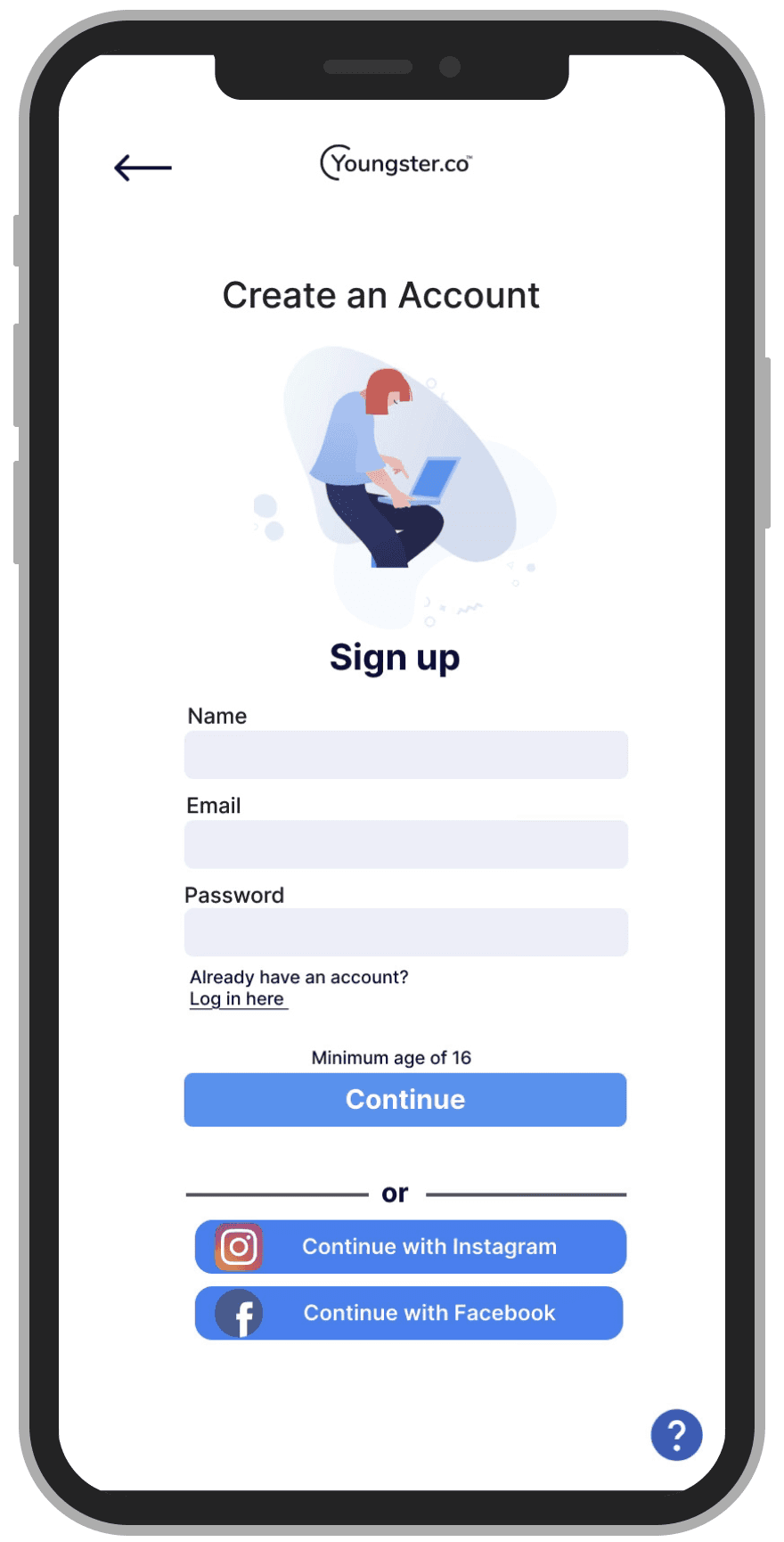
A split log in / sign up tab is the first thing on screen, that way theres no searching for the two buttons.
Larger input fields and looser spacing make each screen instantly legible.
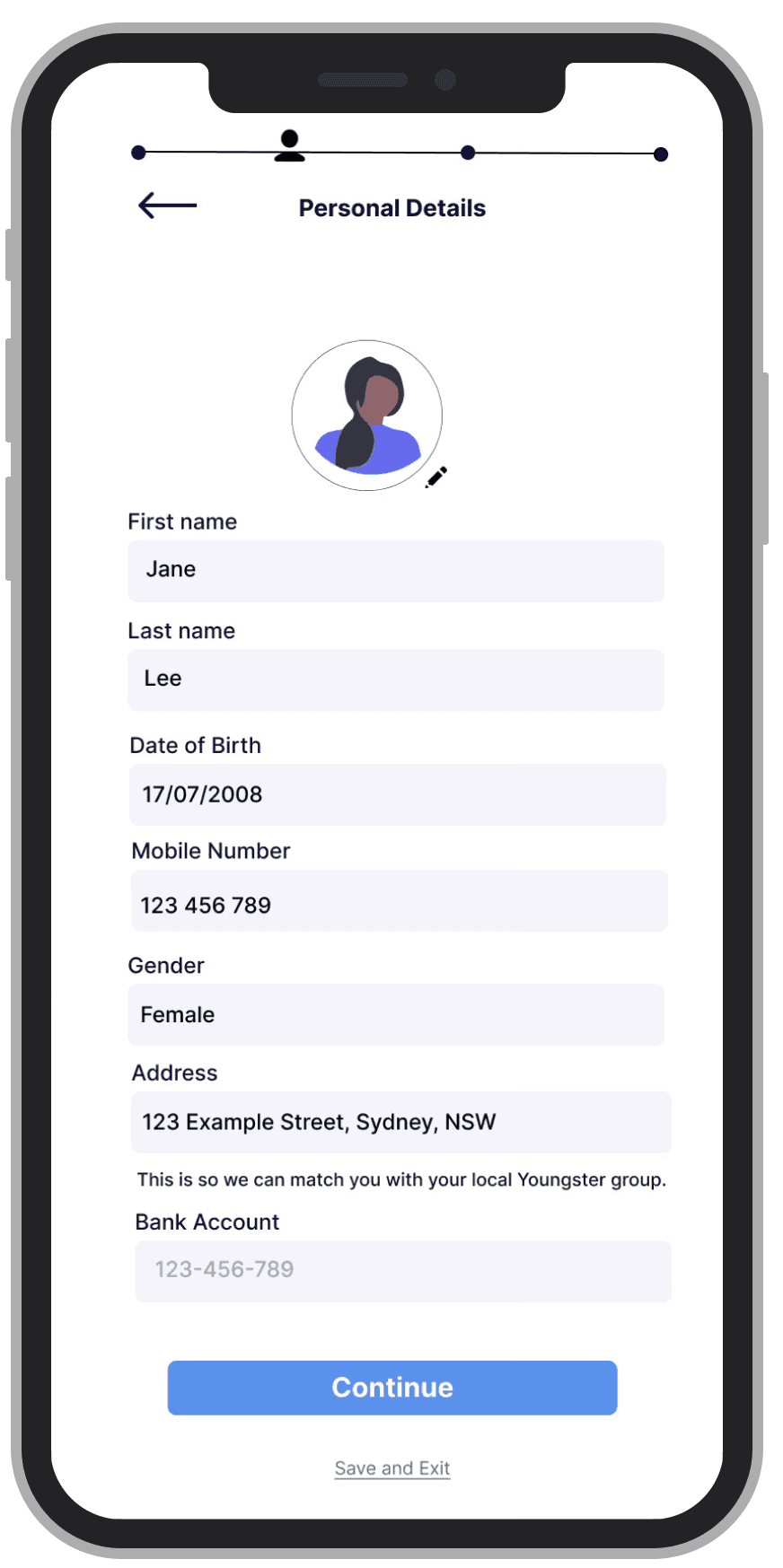
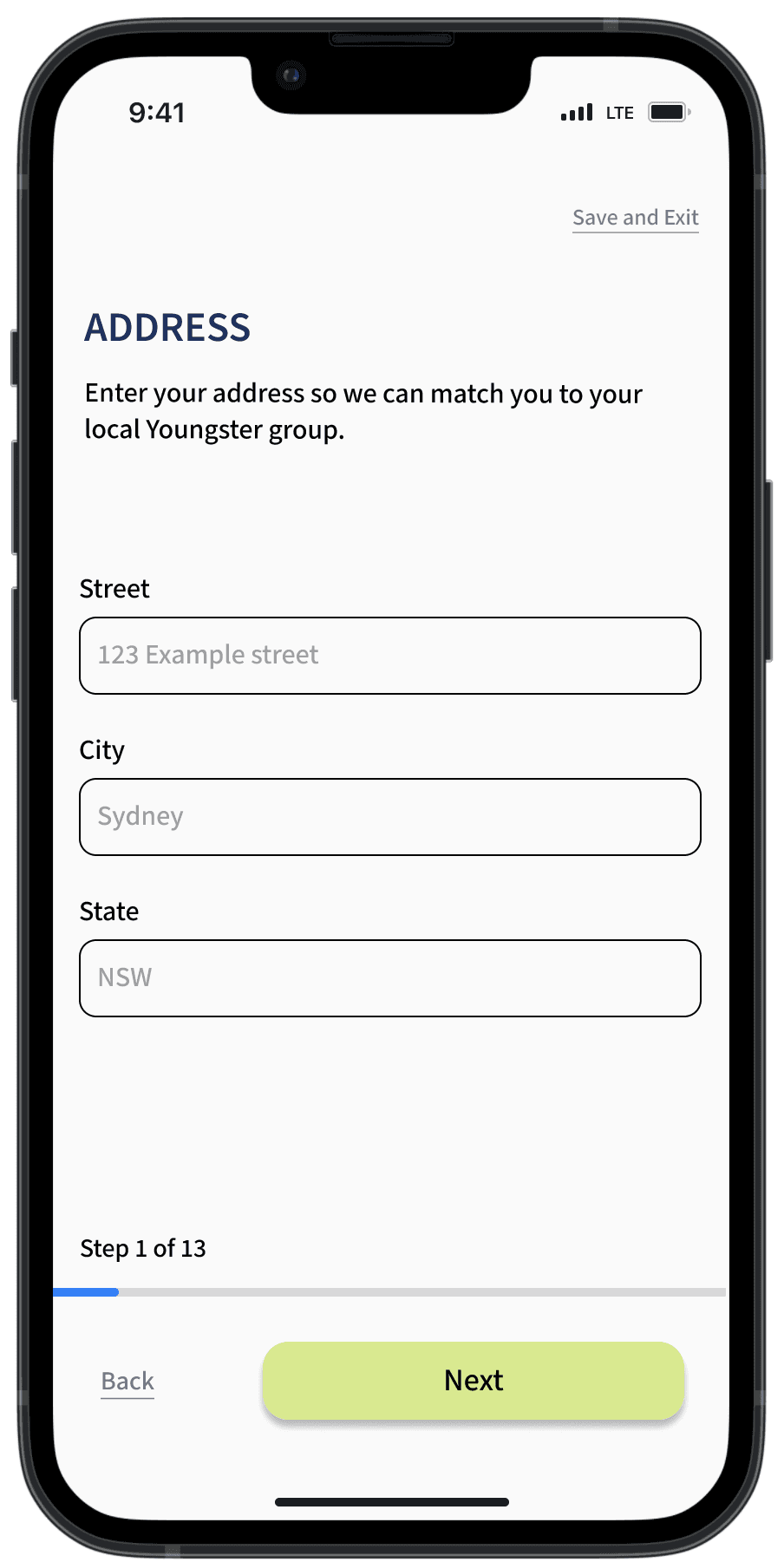
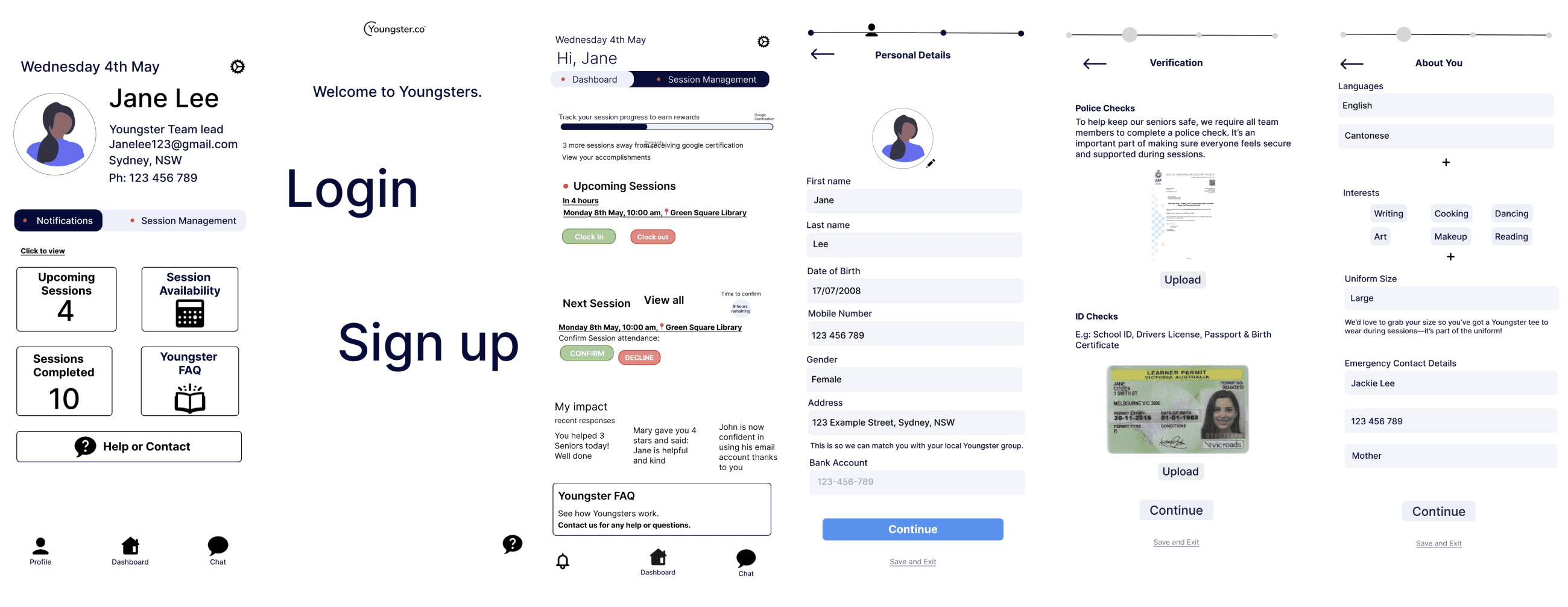
Profile completion: 5 steps —> 10 steps
Counterintuitive on purpose. The competitive analysis showed one-decision-per-screen flows (Duolingo, Mable) outperform dense forms, and testing showed participants stalling on multi-field pages.
Ten light steps with a persistent progress bar and save-and-exit allows users to complete their profile at their own rate.
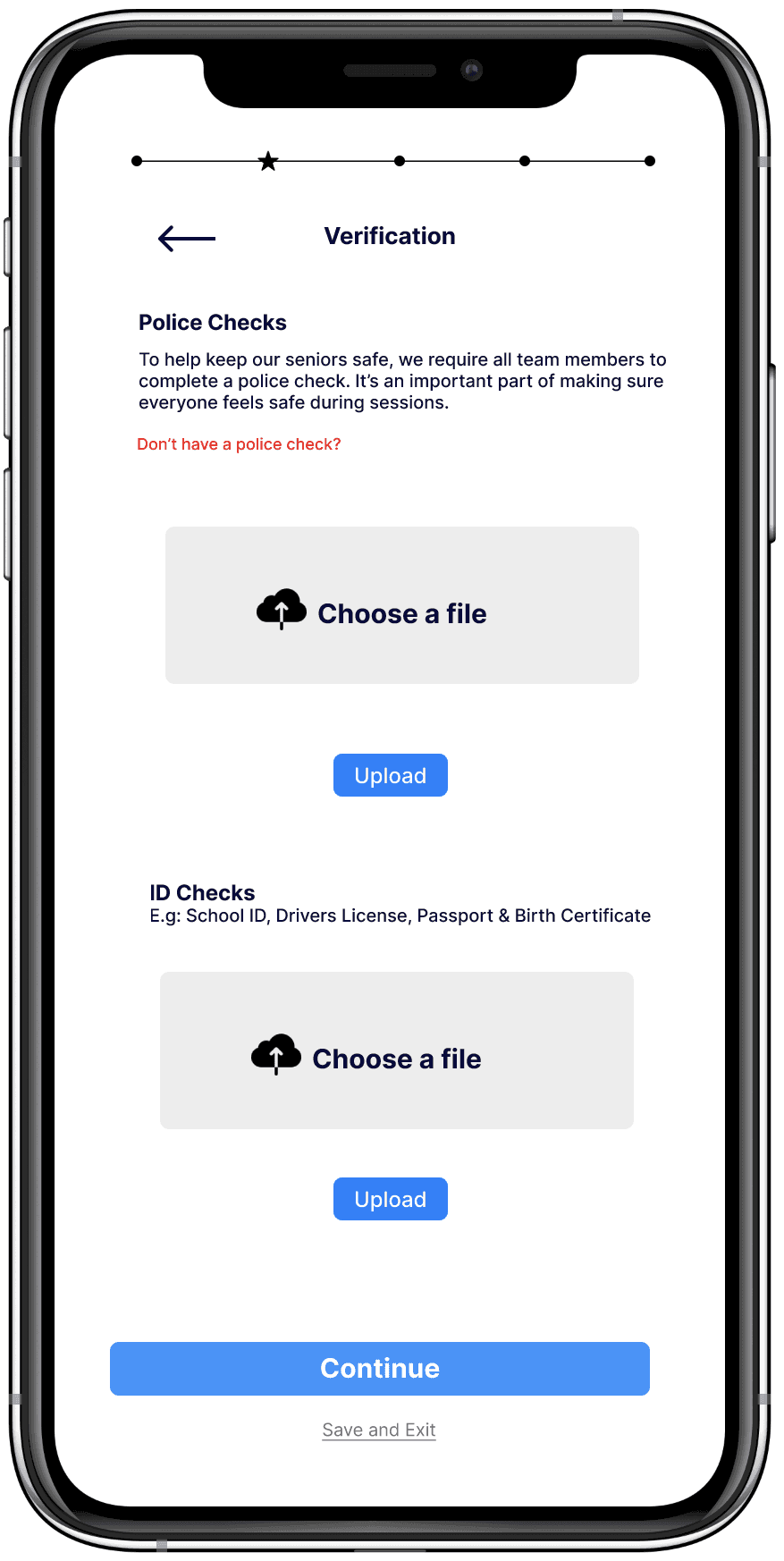

Police check —> Tony's fix
The police check now explains what a police check is and why Youngster requires it.
"I don't have one" now lets first-timers know that their first session covers their police check, it also explains next steps without creating a dead end.
Session management + dashboard
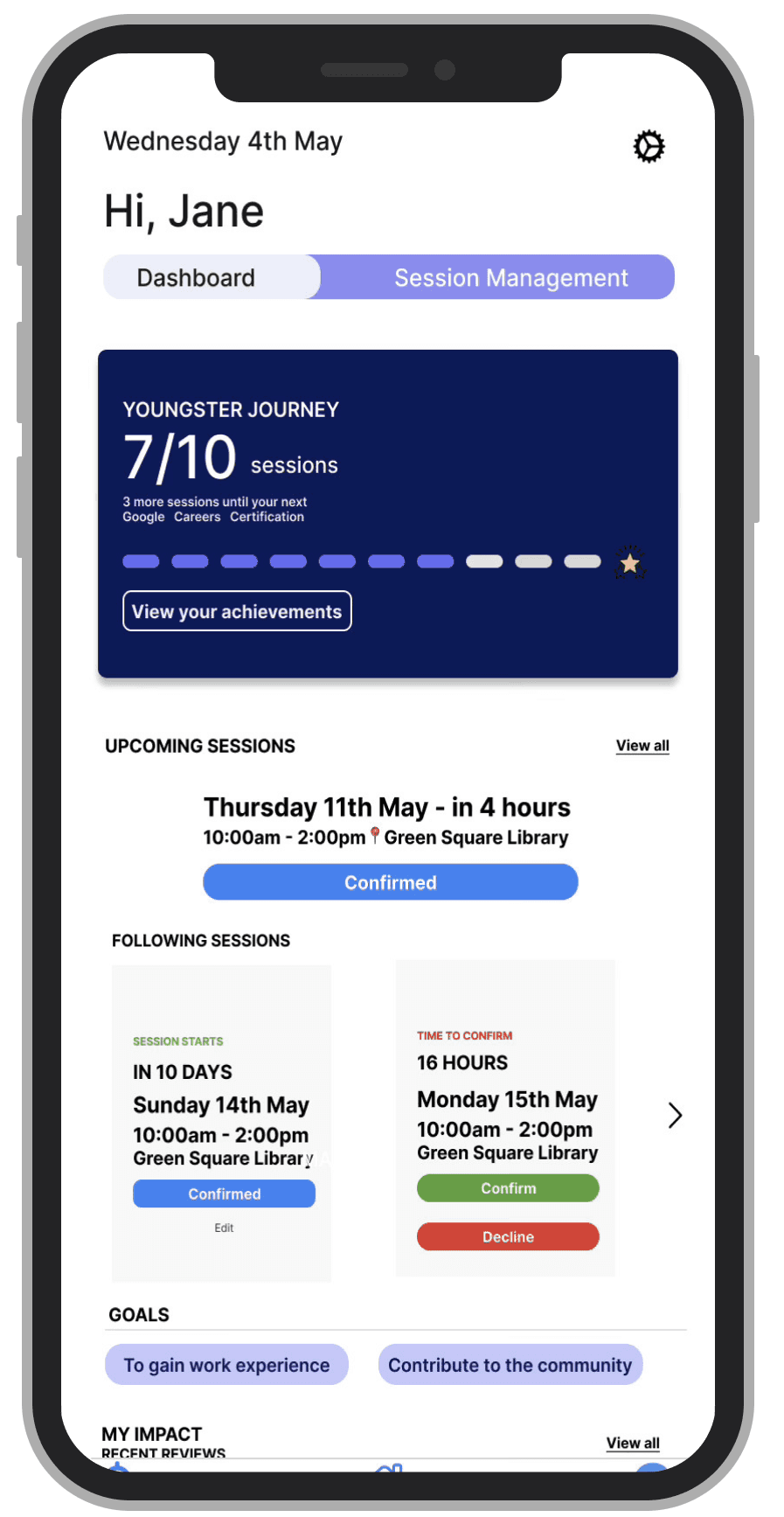
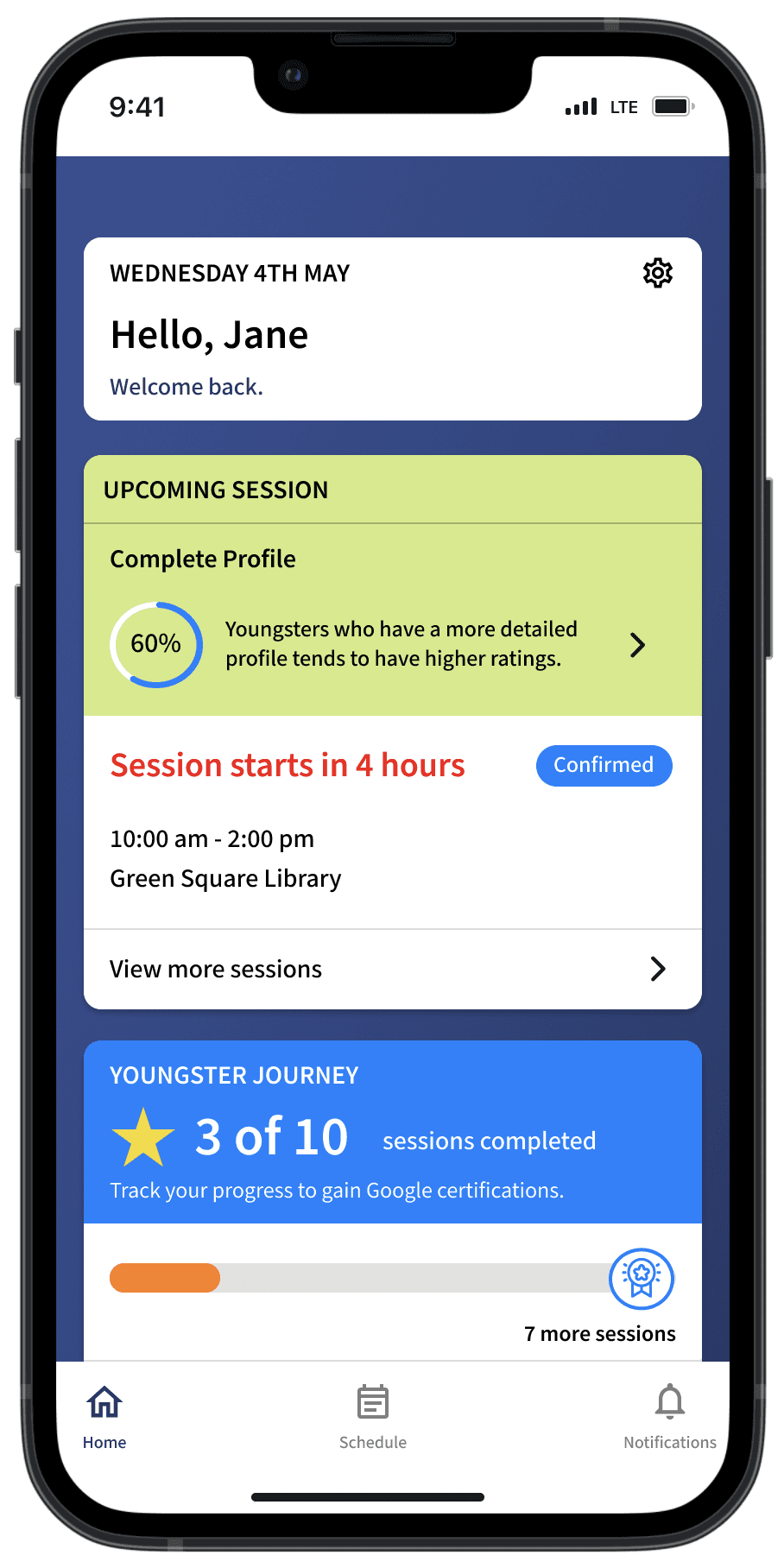
Session cards prioritise time, location, and attendance; the dashboard uses colour-coded sections so users always know where they are.
The content hierarchy has been altered to prioritise information users would need to see first when on their dashboard. Font sizes were also adapted to facilitate important information.
What I learned
I started this project designing for efficiency: to get users through fast before they lose patience. Testing taught me the opposite: users don't abandon slow flows, they abandon unexplained ones. Clarity at each step matters more than step count, which explains the importance of the why behind every task.
Sign-up happens once. It's the platform's single chance at a first impression, which is why well designed sign up flows take time to build a users trust.
Feedback
Renan Castro - Senior UX designer, Mentor
"You delivered your ideas with clarity making complex flows digestible. This really elevated your design."
Youngster
A platform used to teach seniors technology, taught by young people.
Project type: UX Design
Timeline: May - July 2025 (10 weeks), with a self initiated second iteration in January 2026
Project role: Sole UX/UI designer (mentored by Renan Castro, Senior UX designer)
Key skills: UX design, heuristic analysis, competitive analysis, wireframes, user testing.

The problem
Problem: Youngster's CEO believed young users were abandoning sign-up because forms asked for things without explaining why, most notably the police check, which requires payment with no mention that it's covered through a user's first session. Testing confirmed it: 5 of 5 participants hit that exact wall.
Key decisions
Redesigned the police check step to explain what it is, why it's required, and that it's covered for first-timers.
Split profile completion from 5 dense steps into 10 lighter ones, trading step count for one clear decision per screen
Added a persistent progress bar with save-and-exit, so users always know how much is left
Outcome
Testing with 3 participants showed people got stuck when a screen didn't tell them what to do next. I used that to rebuild the flow, including by including coverage and explanations for every step. The second iteration consists of one question per screen over several at once. This new version hasn't been tested yet, that's my next step.
Here's the full story behind that fix, starting with the stakeholder interview that defined the problem.
TL;DR
The client
Youngster connects young people (16-24 y/o) to teach seniors digital skills through paid opportunities.
The problem
Without young people signing up, Youngster has no sessions to offer. According to Youngsters' analytics, 80% of young users who start a profile never finish it.
The clearest failure point came straight from the stakeholder:
“During sign up, most users get stuck on the police check because it requires payment. But most users don't realise that if they don't have a police check, it's covered through their first session. Young people often miss this part when they sign up.” ”
Stakeholder Interview quote by Tony Rothhacker
This quote defined the project
Users abandon forms that demand things without explaining why. A police check sounds expensive and intimidating, unless someone tells them it's covered. Nobody was telling them.
PROJECT OVERVIEW
Design objective
Get young users through sign up on their first attempt by giving every step context: what's being asked, why, and what happens next.
Constraints
I interviewed and tested with 5 participants aged 16–24 from varied working backgrounds (the right demographic, but not active Youngster members).
Findings reflect first time onboarding, not the experience of returning tutors. With client access, I'd test next with active Youngster participants to check whether the flow sets accurate expectations for the sessions themselves.
Three patterns held across each platform, and each one maps to a decision in my final design:
One question per page
Users focus on a single decision at a time —> This is why my profile completion moved from 5 dense steps to 14 light ones. (see final design)
Progress made visible
Whether 2 steps or 9, a progress bar tells users the end is in sight. The antidote to mid flow abandonment. —> Included a progress bar with a save and exit in my flow.
Expectations set inside the flow
Duolingo and Mable explain how the platform works during sign up, not after. Transparency early earns trust later. —> This became my answer to the police check problem.
USABILITY TESTS
Learning more about users
I ran interviews and moderated usability tests on Youngster's current site with 5 participants (16–24, varied working backgrounds), combining behavioural questions with two observed tasks.
Task 1 — Find your way into sign up
4 of 5 participants couldn't find where to start. No clear call to action on the home page; participants clicked through "Partner with us" and "Youngsters" hoping one would begin registration, averaging 3–4 dead-end clicks before locating the sign-in button in the menu bar.
How this informed my design
Added inline context to every step especially steps that required verification, explaining what it is and why it's required.
Included a visible progress bar to have the ability to pause without losing work.
"Just have the homepage really punchy. I don't want to search for things."
Interview quote from Esther
Task 2 — Complete the sign up
5 of 5 participants hit the same wall: the flow felt like it was written for seniors, and steps like the police check and vaccine pass appeared with no explanation of their relevance. This is the drop off Tony described, reproduced in testing.
How this informed my design
Added a clear, visually distinct sign-up button so users don't have to guess where to start.
Simplified the navigation structure, informed by what worked on the platforms I reviewed in competitive analysis.
"I like something that is so minimal… if there's too much stuff, I get distracted."
Interview quote from Esther
A softer theme also ran through the interviews: participants at this age respond strongly to encouragement and belonging.
This shaped the tone of the flow: warm, affirming microcopy rather than administrative language.
"If I don't have people around me, I feel very lonely. Which is why having a community where everyone knows you and understands you feels welcoming."
Interview quote from Eric
Archetype — Jane, the nervous first job seeker
Jane synthesises the five interviews: eager for her first work experience, motivated by encouragement, derailed by ambiguity.
"For me to reach my goals, I need to be more determined to work on my confidence and communication."
— Jane
She values
Knowing what's expected of her and having flexibility
Feeling welcomed rather than processed
She abandons when
A step demands something unexplained
She can't tell when sign up is complete.
Where the journey breaks
Jane's journey map traces the observed sign-up experience: hunting for an entry point → early-flow optimism → the police check moment, where confusion peaks and 4 of 5 test participants stalled.
CHALLENGING MY DESIGN THINKING
Sketches —> wireframes
Crazy 8s to explore layouts and information architecture, prioritising a single path through the flow.
First round of testing (lofi, 3 participants)
Participants were asked to think aloud and were asked to
Sign up
Complete a profile
Account settings
Navigating between dashboard and session management
What I learned
Users preferred a straight forward user flow.
What I did about it
Include clearer visual guidance using buttons and signals to guide them through a step by step flow.
What I learned
Users missed important actions like "save and exit" or "complete profile."
What I did about it
Reduced competing elements per screen and gave key actions more visual weight.
REVISITING THE PROJECT
Why I came back
After two more projects sharpened my design judgement, I re-read this one and saw the problem: my original solution optimised for speed, but the research had been telling me the real currency was clarity. Users didn't need a faster form, they needed a form that explained itself. I rebuilt the flow around that principle.
What changed:
Sign up entry
A split log in / sign up tab is the first thing on screen, that way theres no searching for the two buttons.
Larger input fields and looser spacing make each screen instantly legible.
Profile completion: 5 steps —> 10 steps
Counterintuitive on purpose. The competitive analysis showed one-decision-per-screen flows (Duolingo, Mable) outperform dense forms, and testing showed participants stalling on multi-field pages.
Ten light steps with a persistent progress bar and save-and-exit allows users to complete their profile at their own rate.
Police check —> Tony's fix
The police check now explains what a police check is and why Youngster requires it.
"I don't have one" now lets first-timers know that their first session covers their police check, it also explains next steps without creating a dead end.
Session management + dashboard
Session cards prioritise time, location, and attendance; the dashboard uses colour-coded sections so users always know where they are.
The content hierarchy has been altered to prioritise information users would need to see first when on their dashboard. Font sizes were also adapted to facilitate important information.
Feedback
Renan Castro - Senior UX designer, Mentor
"You delivered your ideas with clarity making complex flows digestible. This really elevated your design."
What I learned
I started this project designing for efficiency: to get users through fast before they lose patience. Testing taught me the opposite: users don't abandon slow flows, they abandon unexplained ones. Clarity at each step matters more than step count, which explains the importance of the why behind every task.
Sign-up happens once. It's the platform's single chance at a first impression, which is why well designed sign up flows take time to build a users trust.
Up next…
RSPCA Knowledge Base
RSPCA Knowledge Base
Helping pet owners actually find answers in RSPCA's Knowledge Base
Helping pet owners actually find answers in RSPCA's Knowledge Base
View Project
The Big Feed
The Big Feed
Why young donors weren't giving to The Big Feed and what would change their minds
Why young donors weren't giving to The Big Feed and what would change their minds
View Project
Karen Huang
Thank you for your interest in my work!
If you’re looking for a UX Designer who cares a lot and loves a good laugh, send me a message, I’d love to connect!
Karen Huang
Thank you for your interest in my work!
If you’re looking for a UX Designer who cares a lot and loves a good laugh, send me a message, I’d love to connect!
Karen Huang
Thank you for your interest in my work!
If you’re looking for a UX Designer who cares a lot and loves a good laugh, send me a message, I’d love to connect!